Articles
How to set up an Osintly organization workspace
Follow the full Osintly organization setup, then see how members, SSO, shared searches, history, credits, billing, and API access work.
By OsintlyRead
Osintly's latest update adds Domain Intelligence and IP Intelligence, limited search previews, and shared organization workspaces. It also gives Personal, Organization, and API plans separate pricing and checkout paths. Here is what changed and where to start.
Domain Intelligence brings DNS records, HTTP behavior, certificate transparency, registration, technologies, security files, and domain risk signals into one tool. You can add subdomains, discovered email addresses, passively observed ports, and available reputation data when the investigation calls for them. The results provide direct pivots to related domains and IP addresses, plus an approximate network-location map when coordinates exist.
The first view loads DNS, HTTP, and risk information, then lets you request other sections as needed. A complete /all lookup can run every collector or a selected set of sections. Successful sections remain available when another collector fails, with partialErrors identifying the gap. Saved results retain the snapshot returned at the time of the lookup; later section requests do not silently rewrite it.
Domain Intelligence also has a separate website-history view. Choose an archived year and then a captured date to inspect an earlier page in an isolated viewer. The archive comes from Wayback, so availability and loading speed depend on that source. The capture list is sampled, not a count of every archived page.
For API users, /dns, /http, /ssl, /technologies, /whois, /security, /risk, and /archives have no core-search credit cost. /subdomains, /emails, /ports, /reputation, and /all cost one core-search credit each. Every route still requires authentication and a plan with Tools access. See the Domain Intelligence reference for request bodies, collector fields, costs, and error handling.
IP Intelligence accepts IPv4 and IPv6 addresses. It combines approximate geolocation, network and ASN details, BGP routing and RPKI status, registration, reverse DNS, passively observed services, reputation signals, and hosted-domain observations. The result page supports map context and pivots from available hostnames or IP addresses.
You can start with geo and network, then load the other sections that matter to your case. /all accepts selected sections, returns collectedSections, and preserves successful collectors when others fail. Add save: true to keep the returned snapshot in History. Reopening that result reads the saved data without executing a new lookup.
The Tools catalog and saved-results guide explains how to find listed tools and reopen their results in the selected workspace.
The focused geo, network, bgp, whois, rdns, and risk API routes have no core-search credit cost. ports, reputation, hosted-domains, and /all cost one core-search credit each. As with Domain Intelligence, access to every route requires an eligible Tools API plan. The IP Intelligence reference lists the full response and route behavior.
Treat the output as leads with source context. Network geolocation does not locate a person. Passive port observations are not a live scan or proof that a service is still exposed. A reported CVE is not a vulnerability assessment, and a missing reputation signal is not a clean bill of health.
Visitors can now run a free preview for a pseudonym or email address from the Search page. Signed-in users without an active app subscription can use the same preview path. It shows a limited set of module cards and account or breach summaries, and may use previously cached data.
A preview is available in the same browser session for 15 minutes. It does not include raw leak datasets, AI analysis, exports, full result details, or an entry in account History. Guest access is limited to two previews in a rolling hour and three in a rolling day per IP address. Signed-in accounts have equivalent per-account limits, with additional shared-network limits. The interface shows remaining capacity and asks for human verification before a guest preview runs.
The free preview guide explains the scope and limits, while the Search guide covers the full search workflow. Free website previews are separate from the public Search API and the Free API plan.
Organizations add a shared workspace without merging it with anyone's Personal workspace. Use the sidebar workspace menu to choose where your next search, saved Tool result, credit use, and API activity belong. The selected organization has its own plan, members, investigations, history, credits, API account, and billing.
The organization setup guide walks through creating a workspace, choosing seats, and inviting members.
An organization can invite members into paid seats and assign Owner, Admin, or Member roles. Members can run and view shared searches; owners and admins have additional management actions. Pro includes 100 shared monthly credits per paid seat, while Ultimate includes 200. Those credits form one organization allowance rather than individual wallets. Self-service setup supports up to 25 paid seats, with larger deployments handled through sales.
In an active organization, investigations group shared searches, notes, and files. Monitoring and alerts also follow the selected workspace, including its plan, permissions, and notification channels. The credits guide explains how shared searches and eligible Tool overrides draw from the organization allowance.
The organization console now exposes Overview, Members, Permissions, Usage, Activity, Credits, Billing, Settings, and Security/SSO views according to role. Activity can be filtered by area, actor, action, and period, then exported as CSV or JSON. Organization owners manage the app subscription and seats; organization API subscriptions have their own billing view. Company SSO checks membership or a valid invitation before granting organization access. Personal and other organization access stay separate.
The organizations guide, members and permissions reference, and activity guide explain those boundaries in detail.
Legacy Teams are read-only while organizations become the shared-workspace model. A Team owner can download a ZIP of the Team's available members, investigations, searches, notes, attachments, and credit history, with warnings for unavailable files. The owner can also preview and transfer the Team into an eligible active organization they own, subject to seat and storage limits. Existing organization roles are preserved where applicable; legacy Editors and Viewers become Members, so check their access before transferring. The Team transition guide details the export, transfer preview, role mapping, and deletion steps.
The transfer moves remaining Team bank credits into the organization's purchased-credit wallet. Pending Team invitations do not become organization memberships and may need to be reissued. Team owners also have a separate, confirmed deletion path. Members can use the legacy investigation export guide to download individual projects they can access. Review the Team transition page in your workspace for current availability before exporting, transferring, or deleting Team data.
History brings searches and saved Tool results into one searchable view. Filter by source or type, sort the table, and reopen an existing result without launching another lookup. In an organization, members can inspect shared history, and authorized roles can export selected complete results as a JSON archive. The export and sharing guide distinguishes that bulk archive from individual result and investigation exports. Dates and times in organization activity, History, usage, and billing views are shown in UTC.
Web Tool lookups now have clearer rolling limits, cooldowns, and concurrency rules. Organization volume grows with paid seats, while each member still has an individual limit. When a volume limit is reached, an eligible user may explicitly spend one credit from the selected workspace to continue; that option does not bypass cooldown or concurrency limits. See the History guide and Tool usage limits.
The pricing page now separates Personal, Organizations, and API plans. Personal offers Standard, Pro, and Ultimate for individual research. Organizations offer per-seat Pro and Ultimate plans, plus an Enterprise sales path. API offers Builder, Growth, Scale, and Enterprise capacity. The page shows current prices, included credits or requests, and a feature comparison for each audience. Read Credits and subscriptions for what a full search costs, how the allowances differ, and how existing subscriptions are managed.
Checkout follows the selected plan and workspace through sign-in or MFA. Personal app plans can be changed from Settings; organization owners manage organization seats and billing; API billing and keys live in the selected workspace's API console. Card and supported Stripe methods use the card checkout, while the separate cryptocurrency path currently supports monthly Personal billing. The success experience may show a processing state while access is being finalized.
App subscriptions and API subscriptions remain separate. The Personal checkout guide covers plan changes and payment methods. The API plans and capacity reference explains workspace-scoped billing, keys, usage, and add-ons; the API authentication guide covers bearer keys and safe handling.
Start with the Search page for a preview or full investigation, use the Tools API overview for focused integrations, or open Pricing to compare the workspace options.
Articles
Follow the full Osintly organization setup, then see how members, SSO, shared searches, history, credits, billing, and API access work.
Announcements
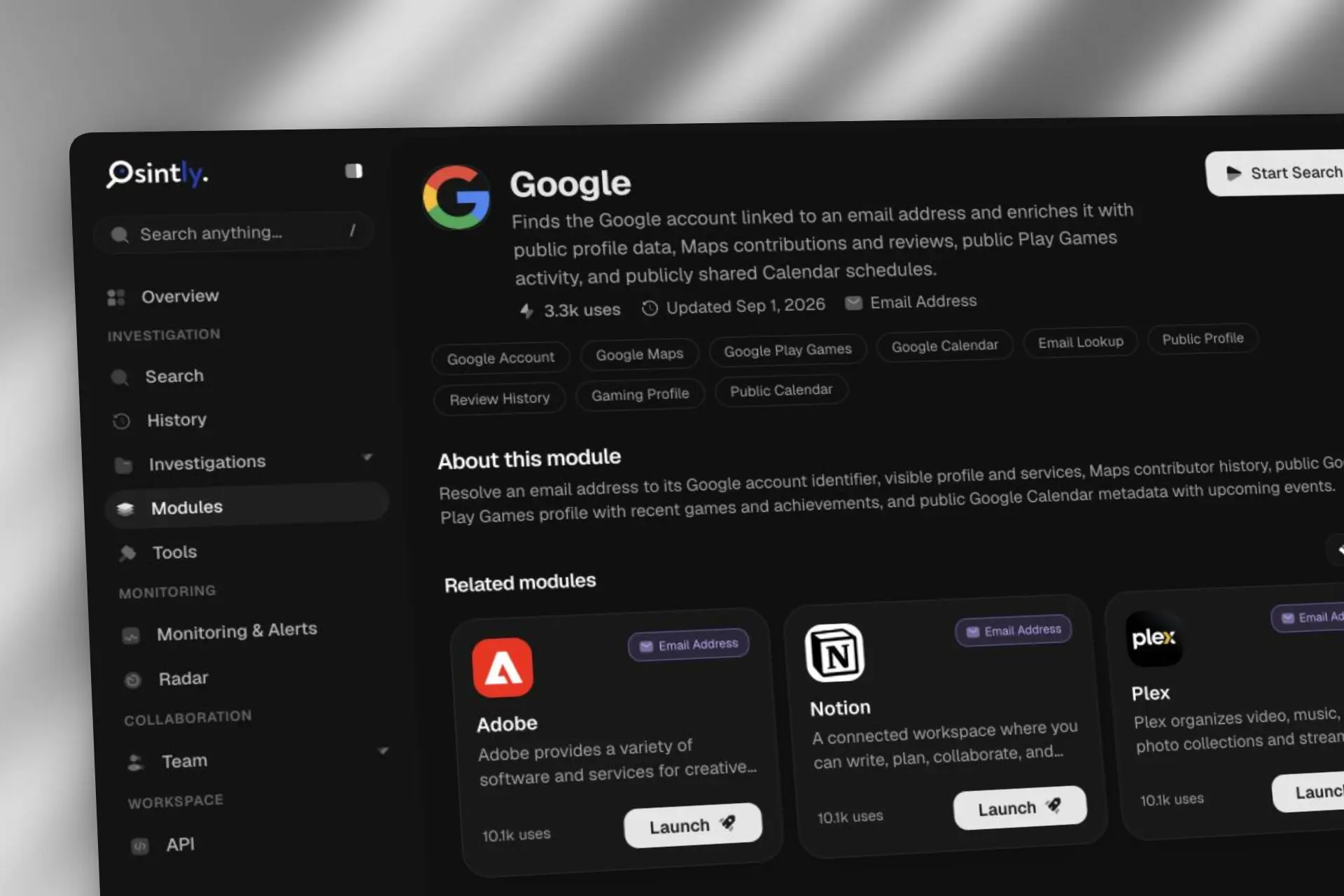
Osintly now offers more than 50 published email OSINT modules. See how Google, Flickr, Garmin Connect, Microsoft Teams, NPM, and more enrich an email address.

Announcements
Fetch domain logos as images via a simple GET request. No auth, CORS enabled, served from the edge.

Announcements
We are sharing an honest look at the infrastructure behind the platform, how we got here, the choices we made, and what we learned along the way.
1,550+ ready-to-use OSINT modules covering people, companies, domains, emails, and more.
Everything you need to integrate Osintly into your workflow, from quick start to advanced APIs.
Connect with thousands of OSINT investigators. Share techniques, ask questions, collaborate.
Tutorials, case studies, and insights from our team of open source intelligence specialists.
1,550+ OSINT modules. AI analyst built-in. Real-time data. Everything you need in one place.